


Have you ever finished a busy day feeling exhausted, only to realize that the most important tasks are still waiting for you? Between work commitments, personal responsibilities, household chores, study goals, and unexpected interruptions, keeping everything organized can feel like a full-time job. A notebook or basic to-do list can help, but sometimes you need more than a place to write things down. You need a practical way to turn scattered thoughts into a clear plan, decide what deserves your attention first, and make adjustments when the day does not go as expected.
That is where free AI prompt tools for daily organization and planning can make a difference. These tools allow you to describe your responsibilities in ordinary language and receive structured schedules, prioritized task lists, project plans, reminders to consider, and useful suggestions. Instead of spending half an hour deciding how to approach your workload, you can ask an AI assistant to organize your ideas into manageable steps. In 2026, popular assistants such as ChatGPT, Google Gemini, and Claude offer free access, although their features and usage limits vary.
The important part is learning how to use these tools effectively. You do not need to understand programming, install complicated software, or become a prompt-engineering expert. You simply need to explain what you want to accomplish, provide the information that matters, and ask for an output you can actually use. This guide explores the best free AI prompt tools, explains what each one does well, and provides practical prompts you can copy, customize, and use in your everyday life.
Why AI Prompt Tools Are Changing Daily Planning

Traditional planning methods usually require you to organize everything yourself. You write down your tasks, estimate how long each one will take, decide which tasks are urgent, and try to fit everything into your available hours. This process works well when you have only a few responsibilities, but it becomes difficult when work, family, education, and personal goals compete for the same limited time. An AI planning assistant can help you process that information faster by grouping related tasks, identifying priorities, suggesting a realistic order of activities, and highlighting potential scheduling conflicts.
Imagine starting Monday with fifteen unfinished tasks, three meetings, a household responsibility, and a deadline approaching on Wednesday. Rather than staring at a long list and wondering where to begin, you can paste your tasks into an AI assistant and ask it to create a realistic schedule. You can specify that you need a lunch break, prefer focused work in the morning, and want to leave some time for unexpected requests. The assistant can then propose a schedule that reflects those preferences, which you can review and adjust before following it. Think of AI as a planning partner that helps arrange the pieces of your day, rather than a machine that automatically knows the perfect answer.
AI prompt tools are also useful because planning is rarely a one-time activity. Your schedule changes, new responsibilities appear, and priorities shift throughout the week. When that happens, you can ask the same assistant to reorganize your remaining tasks instead of rebuilding your entire plan from scratch. Some free assistants also support web searches, document analysis, or connections with productivity services, although access depends on the platform and account. The result is a more flexible planning process that can adapt to real life without requiring you to maintain an elaborate productivity system.
Another advantage is accessibility. Many AI assistants accept everyday language, so you can request a study timetable, a shopping list, a weekly household routine, or a project checklist without learning specialized commands. You can even ask the assistant to explain why it recommends a particular order, helping you improve your own planning habits over time. However, AI-generated schedules are suggestions, not guarantees. You still need to check whether the proposed duration, deadlines, and priorities make sense for your circumstances.
Best Free AI Prompt Tools to Try in 2026
The best AI planning tool depends on the way you work. Some people want one flexible assistant for almost everything, while others prefer a tool that fits naturally into their existing notes, documents, or office applications. The options below are useful starting points because they offer free access in some form, but free plans may include message limits, restricted features, or trial-based AI access. Always check the current terms before building an important workflow around a particular feature.
ChatGPT for Everyday Planning and Task Management

ChatGPT is a strong all-purpose choice for people who want a flexible assistant for everyday organization. You can use it to create a morning routine, prioritize work, break a large project into smaller tasks, prepare for meetings, plan a week of studying, or organize personal errands. Its conversational format makes it particularly convenient because you can refine the results through follow-up requests instead of writing an entirely new prompt every time. For example, after receiving a daily schedule, you can say that one task needs an extra hour and ask the assistant to rearrange the rest of the day.
The free version provides access to everyday chat and a selection of additional capabilities, including web search and file analysis, subject to applicable usage limits. The exact models, features, and quotas can change over time, so consult the official ChatGPT Free Tier FAQ for current information. This makes ChatGPT a useful starting point for students, freelancers, employees, and households that want to experiment with AI-assisted planning without immediately paying for a subscription.
One of its biggest strengths is its ability to work with incomplete ideas. You can type a rough brain dump such as, “Finish the client report, reply to emails, buy groceries, study for an hour, and prepare tomorrow’s presentation,” and ask ChatGPT to organize the list. You can then provide your available hours, task deadlines, and preferred breaks to produce a more practical result. For the best outcome, ask it to distinguish between urgent tasks, important tasks, and activities that can wait until another day.
Example prompt:
Act as my daily planning assistant. Organize the following tasks into a realistic schedule from 9 AM to 6 PM. Prioritize tasks with approaching deadlines, estimate the time needed for each activity, include a 45-minute lunch break, and leave 30 minutes of buffer time. Separate essential tasks from optional ones. If everything cannot fit into the schedule, recommend what I should postpone rather than creating an unrealistic timetable.
My tasks: [insert your tasks and deadlines here].
ChatGPT is particularly suitable when you want one tool that can handle several different planning challenges. Its main limitation is that a generated schedule does not automatically become an event in your calendar or a completed task in your to-do app simply because it appears in the response. Unless you use a supported integration or action, you will need to transfer the plan yourself.
Google Gemini for Personal and Work Organization
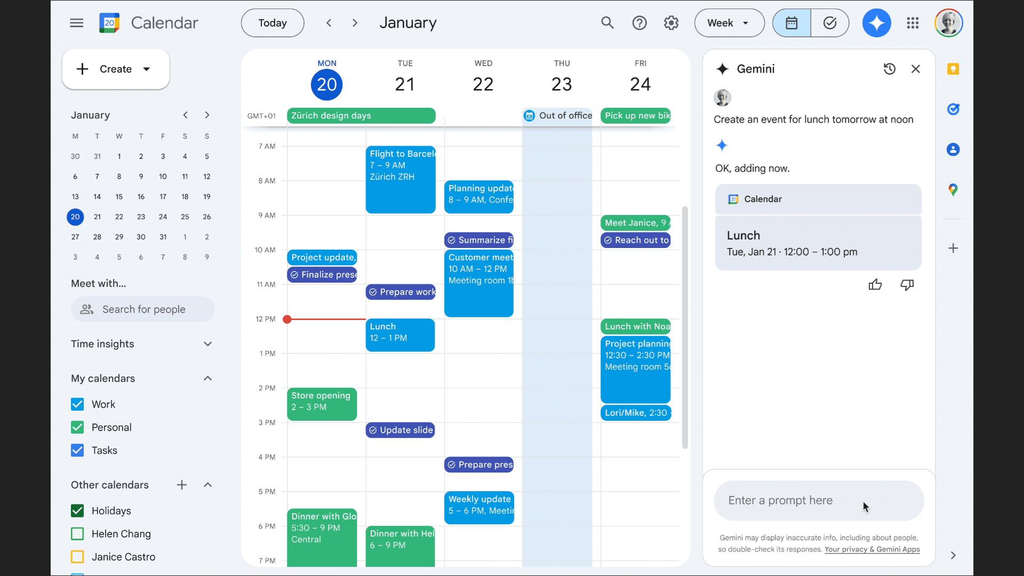
Google Gemini is another useful free AI assistant, especially if you already use Google services for work, study, or personal organization. Its general-purpose assistant can help you plan a day, structure a weekly routine, summarize information, brainstorm solutions, and turn a list of responsibilities into an actionable plan. The free offering includes everyday assistance, while the available models and additional features depend on Google’s current plan, regional availability, and usage limits.
Suppose you use Google Calendar to manage meetings and Google Docs to store your project notes. Gemini can help you reason through a schedule or transform a document’s contents into a checklist. Depending on your account and the features available to you, Google-connected capabilities may also make certain workflows more convenient. However, do not assume that every user has access to the same integration or that every prompt will automatically change calendar events. Confirm which actions your version of Gemini supports before relying on it for scheduling.
Gemini can be especially helpful for people who plan around information gathered from multiple sources. You might need to prepare for a meeting, review a set of notes, and identify the actions that should happen afterward. By asking the assistant to summarize the key points, extract deadlines, and separate decisions from unresolved questions, you can create a more organized starting point. You can also ask it to produce a morning checklist that includes your top priorities, meetings, preparation tasks, and personal commitments.
Example prompt:
Help me plan a productive day using these commitments: [paste meetings, deadlines, and personal tasks]. Identify my three most important outcomes, suggest suitable time blocks for focused work, and group small administrative tasks together. Include realistic breaks and preparation time before meetings. Present the result as a table with time, activity, priority, and expected outcome. Flag any conflicts or missing information rather than guessing.
Gemini is a good option if you want an everyday assistant and already work within Google’s ecosystem. Its main drawback is that feature availability can vary, so check the current free plan and available integration before selecting it as your main planning system.
Claude for Complex Schedules and Thoughtful Planning

Claude is worth considering when your planning involves lengthy instructions, complicated projects, or decisions that require careful consideration. You can use it to organize a large collection of responsibilities, develop a project road map, summarize notes, prepare a structured checklist, or identify dependencies between tasks. Rather than simply asking for a list of activities, you can explain the outcome you want, the obstacles you face, and the limitations you need to respect. Claude can then help turn that information into a coherent plan.
Claude offers a free plan, but its usage is limited and can vary depending on demand and the features you use. Its official website describes the current plans and available capabilities. This makes it an accessible option for people who want to test AI-assisted planning without committing to a paid subscription, although frequent users may encounter limits.
Consider a freelancer who needs to deliver three client projects, prepare invoices, update a portfolio, and reserve time for prospecting. A simple to-do list may show all the tasks but fail to explain which activities depend on others. Claude can help organize the work into stages, identify what needs to happen first, and suggest a sequence that reduces unnecessary switching between projects. You can also request a risk list that identifies likely delays and recommends what to do if a deadline changes.
Example prompt:
Help me create a realistic seven-day plan for completing these projects: [describe each project, deadline, and remaining work]. My available working time is [hours per day], and these commitments cannot be moved: [list commitments]. Break each project into small, measurable tasks, identify dependencies, estimate time ranges, and recommend daily priorities. Include a contingency plan for delays. Clearly label assumptions and ask questions if important details are missing.
Claude is particularly useful for thinking through complicated work before transferring the results into a calendar or project manager. It is less appropriate as a sole source of truth for appointments and deadlines unless the relevant information is maintained in a connected system and the supported features allow you to access it.
Notion AI for Notes, Projects, and Knowledge Management

Notion is designed to help people organize notes, documents, databases, and projects in one workspace. Its AI features can assist with tasks such as summarizing notes, improving written content, extracting action items, and helping organize information. This combination can be valuable when your daily plan needs to remain connected to project documents rather than existing as a separate response in a chat bot.
There is an important distinction between Notion’s free workspace and unlimited free AI access. According to Notion’s official help documentation, users on Free and Plus plans can try Notion AI features, but complimentary AI responses are limited; continued use of certain AI capabilities may require an eligible paid plan. If your goal is to use AI prompts frequently without paying, evaluate that restriction before making Notion AI the foundation of your routine.
Notion can still serve as a practical organizational hub even if you use another free assistant to generate your plans. For instance, you can ask ChatGPT or Claude to create a weekly project checklist and then copy the approved tasks into a Notion database. You can group those tasks by deadline, project, or status, while keeping supporting notes nearby. This approach separates the job of generating ideas from the job of maintaining a consistent record of your work.
Example prompt for use with Notion AI or another assistant:
Turn these meeting notes into an organized project record. Identify decisions, action items, responsible people, deadlines, unresolved questions, and risks. Separate confirmed information from assumptions. Present the action items in a table that I can transfer into my project tracker. Do not invent owners or deadlines when the notes do not specify them.
Notion is most useful when you need a lasting home for your plans, notes, and project history. If you only need a quick daily schedule, a standalone chat bot may be simpler and more economical.
Perplexity AI for Research-Based Planning

Planning sometimes requires more than deciding what to do. You may need to compare courses before choosing one, research travel options, understand new software, or collect reliable information before starting a project. Perplexity is designed around AI-assisted search and research, making it useful when you want answers supported by links to sources that you can inspect.
For example, imagine that you are planning a professional development month and want to compare free courses, identify their prerequisites, and choose a realistic learning path. You can ask Perplexity to research the options, summarize the differences, and provide source links. After reviewing the evidence, you can use a general-purpose assistant to transform your findings into a weekly schedule. This combination helps separate research from execution: one stage gathers information, while the next turns it into concrete activities.
Example prompt:
Research five reputable free online courses for learning [subject]. Prioritize courses that are currently accessible without payment, identify any certificates or prerequisites, and include links to the official course pages. Distinguish verified details from information that remains unclear. Then suggest a four-week study plan based on five hours of available study time per week.
The free version of Perplexity provides access to its core search experience, while advanced research capabilities and usage limits can differ by plan. Check its current terms before relying on a particular research mode. Remember that citations are a starting point for verification, not proof that every statement is correct. Open the original sources, particularly when planning around deadlines, fees, eligibility requirements, or other details that may change.
Perplexity is best viewed as a research companion rather than a dedicated calendar or task manager. It is particularly helpful when a good plan depends on accurate, current information.
Microsoft Copilot for Workday Productivity

Microsoft Copilot is a practical option for people who work with Microsoft products or want a general AI assistant for everyday tasks. Depending on the version you use, it can help draft emails, summarize information, prepare meeting agendas, brainstorm solutions, and organize work into a series of manageable actions. These capabilities are especially helpful when your day includes a mixture of communication, documentation, and project coordination.
Imagine that you have a long list of emails to answer, a report to finish, and several questions to resolve before a meeting. You can ask Copilot to help prioritize the work, draft an agenda, or turn your notes into a structured action list. If you are using a version integrated with Microsoft 365, additional capabilities may be available within supported applications, but those features should not be assumed to be included in every free account.
Example prompt:
Act as my workday organization assistant. Based on the tasks below, create a prioritized plan for my available working hours. Separate communication tasks, focused work, and administrative activities. Identify anything that can be delegated, postponed, or completed in less than ten minutes. Include preparation time for meetings and summarize the three outcomes I should aim to achieve before the end of the day.
Copilot is worth trying if you already use Microsoft tools or want an assistant for workplace organization. Before adopting it for a specific workflow, check whether the functions you need are available in the free experience or require a Microsoft 365 subscription.
Google NotebookLM for Organizing Information

Google NotebookLM is a useful specialist tool when your planning depends on information contained in documents, research materials, notes, or other supported sources. Instead of beginning with a blank conversation, you can build a notebook around the materials you need to understand and ask questions grounded in those sources. This makes it particularly useful for students, researchers, content creators, and professionals who must turn a large amount of information into an actionable plan.
Suppose you are preparing for an examination and have several course documents, a syllabus, and notes from previous lessons. You can use NotebookLM to help identify major topics, summarize relevant material, and organize a revision schedule around the information you provide. Similarly, a project manager might use it to review project documentation and extract decisions, outstanding questions, and important milestones. You should still verify the resulting plan against the original documents, especially when precise deadlines or requirements matter.
Example prompt:
Using only the sources available in this notebook, create a two-week study plan for [subject]. Identify the major topics, relevant sections, and any stated examination requirements. Divide the material into daily sessions, include review and practice time, and flag any topics that the sources do not cover adequately. Do not invent examination dates or requirements.
NotebookLM is not a replacement for a general-purpose daily planner. Its main advantage is helping you organize source material into useful summaries and learning or project plans. Check its current free usage allowances and supported source formats before uploading a large collection of documents.
How to Write Effective AI Prompts for Daily Organization

Choosing the right tool is only half the job. The quality of your plan also depends on how clearly you explain your situation. A vague prompt such as “Help me organize my day” might produce a reasonable-looking schedule, but it does not tell the assistant what your deadlines are, how much time you have, or which responsibilities matter most. The answer may look polished while being completely impractical for your actual circumstances. A better prompt provides the essential details and explains what the finished plan should look like.
Think of a prompt as a short briefing you would give a capable personal assistant. You would not ask a human assistant to organize your entire week without mentioning your appointments, work hours, or deadlines. The same principle applies to AI. Tell the tool what you want to achieve, explain the restrictions it must respect, and specify the format you prefer. For instance, requesting a table with time slots, task priorities, and estimated duration is more useful than asking for a general list of productivity tips.
Use Context, Constraints, and Clear Instructions
A practical AI prompt can follow a simple structure: role, goal, context, constraints, and output. You do not need to include every element for every request, but these five components provide a reliable starting point for complicated planning tasks.
The five-part planning prompt
1. Role
Tell the AI how to approach the task.
“Act as my practical daily planning assistant.”
2. Goal
Define the outcome you want.
“Help me complete my three most important tasks today.”
3. Context
Provide the information the AI needs.
“I have six hours available and a report due tomorrow.”
4. Constraints
Explain what must or must not happen.
“Keep my 1 PM meeting fixed and include a lunch break.”
5. Output
Specify the format of the response.
“Return a time-blocked schedule with priorities and estimated duration.”
The difference becomes clear when you compare two requests. “Make me productive” leaves almost everything open to interpretation. By contrast, “Create a weekday routine for a remote worker who starts at 9 AM, has two scheduled meetings, needs three hours of focused work, and wants to finish by 5 PM” gives the assistant something concrete to work with. The second prompt does not guarantee a perfect result, but it reduces ambiguity and makes the output easier to evaluate.
You should also tell the assistant when information is missing. Ask it to identify scheduling conflicts, label uncertain estimates, and request clarification instead of inventing deadlines. If it produces an unrealistic schedule, do not throw away the entire response. Explain which parts do not work and ask for a revision. Effective prompting is usually a conversation in which the plan improves through feedback.
Practical AI Prompts for Everyday Planning
The real value of these tools appears when you use them to solve recurring problems rather than experimenting with random prompts. Daily scheduling, weekly reviews, meal planning, study sessions, and household administration are all suitable starting points. You can adapt the following examples for ChatGPT, Gemini, Claude, Copilot, or another assistant that supports ordinary text prompts. Replace the information in brackets with your own details, and review the output before using it.
Daily Schedules, Weekly Goals, and Priority Lists
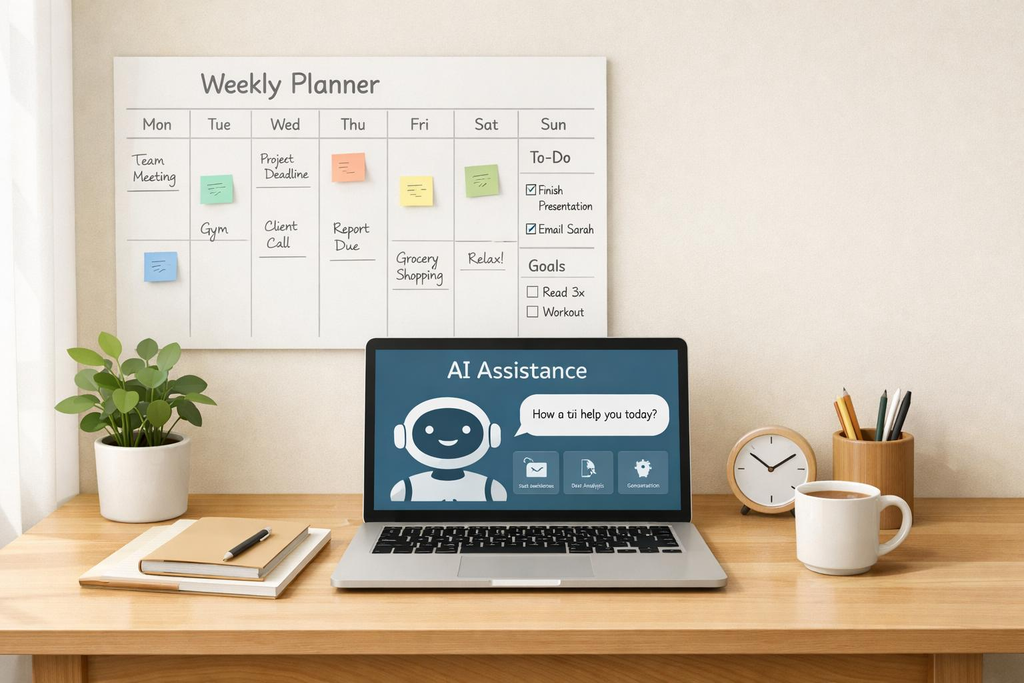
A daily plan should help you decide what to do next without pretending that every minute can be controlled. Begin by listing your tasks, the deadlines attached to them, and the hours you actually have available. Ask the assistant to identify a small number of high-impact outcomes and arrange the remaining work around them. It can also help you separate tasks that require concentration from routine activities such as replying to messages or organizing files. This reduces the temptation to spend the whole morning on easy work while a difficult but important task remains unfinished.
Prompt 1: Plan my day
Act as my daily productivity coach. I have [number] hours available today. My tasks are [insert tasks, deadlines, and estimated duration]. My fixed commitments are [insert appointments]. Choose my three highest-priority outcomes, arrange the tasks into realistic time blocks, and include breaks and buffer time. Flag tasks that do not fit and recommend what to postpone. End with a short checklist I can follow.
Weekly planning requires a slightly different approach because it involves balancing immediate deadlines with longer-term goals. A useful weekly plan should not simply distribute tasks evenly across seven days. Some tasks depend on earlier work, some require longer periods of concentration, and others need to happen at specific times. Asking the AI to identify these relationships can help you create a more logical sequence. You should also leave room for unexpected requests, because a weekly plan that collapses after one interruption is not a particularly useful plan.
Prompt 2: Create a weekly plan
Help me organize the coming week. My goals are [insert goals], my deadlines are [insert deadlines], and my available hours are [insert availability]. Identify the milestones I should reach by Friday, divide each goal into manageable actions, and assign realistic days for the work. Account for fixed appointments, dependencies, and unexpected delays. Include a 15-minute weekly review and identify the tasks that matter most if I fall behind.
Another common problem is deciding which task deserves attention first. A long to-do list often mixes important work with activities that simply feel urgent because they are easy to notice. An AI assistant can help categorize tasks by deadline, impact, effort, and dependency, giving you a clearer view of what deserves your attention. However, the final priority order should reflect your actual responsibilities rather than the assistant’s assumptions. A short task that takes five minutes may be worth doing immediately if it unblocks a colleague, while an apparently urgent request may be safe to schedule for later.
Prompt 3: Prioritize my to-do list
Organize these tasks by urgency, importance, effort, and dependencies: [paste your list]. Divide them into “do today,” “schedule later,” “delegate if possible,” and “remove or reconsider.” Explain the reasoning behind the most important decisions, identify any deadlines I need to confirm, and suggest the single best task to start with. Do not assume that every task must be completed today.
Meal Planning, Personal Errands, and Study Routines
Daily organization extends beyond the workplace. You may need to plan meals, shop for groceries, arrange household chores, prepare for examinations, or fit exercise into an already busy schedule. These activities can create significant mental clutter because each involves several small decisions. A free AI assistant can help you group related activities, reduce repeated decision-making, and create a routine that fits your actual time and resources.
Meal planning provides a straightforward example. Rather than asking for a generic weekly menu, share your budget, dietary preferences, cooking time, household size, and ingredients you already have. The assistant can suggest meals and produce a corresponding shopping list. You should verify ingredient quantities, food safety guidance, and any health-related dietary requirements rather than relying on generated advice without checking it.
Prompt 4: Organize meals and groceries
Create a seven-day meal plan for [number] people with a budget of [amount]. My food preferences are [preferences], ingredients already available are [ingredients], and the maximum cooking time is [minutes] per meal. Suggest practical meals, reuse suitable ingredients to reduce waste, and create a categorized grocery list. Provide approximate costs only when reliable local price information is available, and identify any assumptions.
Personal errands are another excellent use case because they often involve several short activities that can be grouped together. You might need to collect a package, buy household supplies, visit a service center, and complete a bank-related task. Ask the assistant to group errands by location, identify any opening-hour information that needs checking, and separate essential trips from optional ones. If travel time matters, provide approximate distances or use a map to verify the route rather than trusting an invented estimate.
Students can use similar prompts to turn broad learning goals into daily actions. Instead of asking an AI to “help me study,” explain the examination date, subjects, available hours, current understanding, and time needed for practice. Request a schedule that alternates learning new material with reviewing earlier topics and answering practice questions. The result should be a plan you can follow, not an ambitious timetable that ignores fatigue or other commitments.
Prompt 5: Build a study timetable
Help me prepare for [exam or learning goal] by [date]. My subjects or topics are [list], my current strengths and weaknesses are [details], and I can study [hours] per day. Build a realistic timetable with focused sessions, short breaks, revision, and practice questions. Schedule more time for difficult topics without neglecting the others. Include a weekly progress check and adjust the workload to leave time for sleep and existing commitments.
These prompts work best when you treat the output as a draft. If the meal plan exceeds your budget, ask for less expensive alternatives. If the study schedule gives you too little time for a difficult subject, explain the problem and request a revision. A short feedback loop often produces a more useful result than trying to write one enormous prompt that anticipates every possible detail.
How to Choose the Right Free AI Planning Tool
With several capable tools available, it is tempting to sign up for all of them. However, switching between multiple assistants can create another organizational problem instead of solving the first one. A better approach is to choose one primary tool, use it consistently for a week, and add a second tool only when you identify a specific gap. For example, a general-purpose assistant may handle your daily schedule while a source-focused research tool helps you prepare for a project or examination.
The right choice depends on your main requirements. If you need help with a broad mix of personal and professional tasks, ChatGPT is a sensible starting point. If you already work in Google’s ecosystem, Gemini may be more convenient. Claude is worth trying for detailed project planning and lengthy instructions, while Notion is more appropriate when your plans need to live alongside notes, documents, and project databases. Perplexity is useful when research and source links are central to your planning, and NotebookLM can help turn supplied documents into structured learning or project plans.
The following table summarizes the main differences. Free access does not necessarily mean unlimited access, and features can change, so consider this a practical guide rather than a permanent ranking.
| Tool | Best for | Free-access consideration |
|---|---|---|
| ChatGPT | Daily schedules, task prioritization, brainstorming | Free access with usage limits on some features |
| Google Gemini | Everyday planning and Google-oriented workflows | Free tier available; feature access varies |
| Claude | Complex projects and detailed planning | Free tier available with usage limits |
| Notion AI | Notes, documents, and project organization | Complimentary AI usage is limited |
| Perplexity | Research and source-supported planning | Free search access; advanced features may be limited |
| Microsoft Copilot | General productivity and Microsoft-oriented work | Availability depends on the product and account |
| Google NotebookLM | Planning from documents and study materials | Free access with usage allowances |
Official plan information is available through the ChatGPT help center, Google Gemini, Claude, and Notion’s AI help documentation
Before choosing a tool, consider four practical questions. First, can you use it without paying for the specific features you need? Second, does it produce useful answers from the information you provide? Third, can you easily move the results into your existing calendar, notes, or task manager? Finally, are you comfortable with the way it handles your information? The best tool is not necessarily the one with the most impressive feature list; it is the one that fits your routine without adding unnecessary complexity.
Common Mistakes to Avoid When Using AI for Organization
AI-assisted planning can save effort, but it is not automatically effective. One common mistake is treating every generated schedule as realistic. An assistant might assign four hours of work to a two-hour window, overlook travel time, or fail to account for the preparation needed before a meeting. Always check the schedule against your actual commitments, energy levels, and available resources. If the plan does not fit, tell the assistant what is wrong and ask for a practical revision.
Another mistake is providing too little information. If you simply ask for a productive routine, the AI may return generic advice that could apply to almost anyone. Useful context makes a difference: your working hours, fixed commitments, task duration, deadlines, and personal preferences help the assistant create a plan that is more relevant to your circumstances. You do not need to share every personal detail, however. Provide only the information needed to complete the task.
A third problem is using too many tools at once. When your tasks are scattered across several chat histories, spreadsheets, note-taking apps, and planning dashboards, you may spend more time maintaining the system than completing the work. Choose a single place to maintain your authoritative task list and calendar. Use AI to generate or refine plans, then transfer the decisions you accept into that system. This creates a clear distinction between suggestions and actual commitments.
You should also avoid assuming that an AI assistant has completed an action simply because it describes the action in its response. A proposed calendar entry is not necessarily a saved calendar event, and a generated reminder is not necessarily an active notification. Verify that any supported integration has actually completed the requested action. When the assistant lacks the required integration, create the event or task yourself.
Finally, protect your privacy. Avoid pasting passwords, authentication codes, financial account credentials, confidential customer information, or sensitive workplace documents into an AI tool without appropriate authorization and safeguards. Review the service’s privacy settings and data-handling policies before using it for personal or professional information. For important decisions, verify facts against trustworthy sources rather than assuming that a confident answer is correct.
The goal is not to automate every decision or fill every minute of your calendar. It is to reduce unnecessary mental effort, make priorities clearer, and create more room for the work and personal activities that matter most.
Conclusion
The best free AI prompt tools for daily organization and planning can help you turn an overwhelming list of responsibilities into a manageable routine. ChatGPT is a strong all-around starting point, Gemini is useful for people who prefer Google’s ecosystem, and Claude can help with detailed planning. Notion AI is worth considering for workspace organization, Perplexity supports research-based decisions, Microsoft Copilot can assist with everyday productivity, and NotebookLM is useful when your plans depend on source documents.
You do not need to use all seven tools to become more organized. Start with one assistant and three practical tasks: plan your day, prioritize your to-do list, and review your week. Use clear prompts, check the results, and refine your approach based on what works. As your routine develops, you can introduce additional tools if they solve a specific problem.
Remember that AI is most effective when it supports a consistent planning habit. A simple schedule you actually follow is more valuable than an elaborate system you abandon after two days. Use these tools to make better decisions, protect time for important work, and stay flexible when life changes your plans.
Frequently Asked Questions
1. What is the best free AI tool for daily planning?
ChatGPT is a strong starting point for general daily planning because it can organize task lists, suggest schedules, prioritize responsibilities, and refine plans through conversation. Gemini and Claude are also useful alternatives. The best choice depends on the features you need, your preferred workflow, and the free usage limits currently available.
2. Can AI create a daily schedule from a simple to-do list?
Yes. Most general-purpose AI assistants can turn a list of tasks into a proposed schedule when you provide your available hours, deadlines, and fixed commitments. For better results, include estimated task duration, breaks, and priorities. Review the final schedule carefully because the AI may misjudge how long an activity will take or overlook a constraint.
3. Are free AI planning tools really free?
Several popular assistants offer free access, but their free plans may restrict certain models, advanced features, integration, or usage volumes. Notion AI, for example, provides limited complimentary AI responses rather than unlimited ongoing AI usage. Always check the official pricing and feature information before relying on a tool for a regular workflow.
4. What is the best AI prompt for organizing a busy day?
A useful prompt explains your tasks, available time, deadlines, and fixed commitments, then asks the assistant to prioritize activities and produce a realistic time-blocked schedule. You can start with this template: “Organize my tasks for today based on urgency, importance, and estimated duration. Respect my fixed commitments, include breaks and buffer time, and identify what I should postpone if everything cannot fit.”
5. Can AI tools automatically manage my calendar and reminders?
Some AI products offer supported integration or actions that can create or update calendar events, tasks, or reminders, but these capabilities are not available in every free plan. A text-generated schedule alone does not create an appointment or activate a reminder. Check the available integration, grant only the permissions you need, and verify that important changes have actually been saved.

2 Comments
Pingback: How to Detect AI-Generated Text Accurately: 2026 Guide
Pingback: Simple AI Tools to Clean Up Noisy Audio Recordings