








Search Engine Optimization (SEO) can seem complex, but anyone with a website or online content can learn how to improve visibility on Google without spending a dime. This guide breaks down essential SEO principles into clear steps and practical examples that beginners can follow with confidence.
What Is SEO and Why Does It Matter
SEO stands for Search Engine Optimization — the practice of optimizing your website so it appears higher in organic (non-paid) search results. When done right, SEO helps your content:
- Reach the right audience
- Build credibility and authority
- Drive consistent, long-term traffic
Google’s algorithm evaluates countless signals to assess relevance and quality. By following best practices grounded in expertise, experience, authority, and trustworthiness (E-E-A-T), you set your content up for success. For a deep dive into how Google evaluates quality, see Google’s Search Quality Evaluator Guidelines.
Understanding How Google Ranks Content
Crawling, Indexing, and Ranking
Google uses automated programs (bots) to crawl the web, index pages, and determine how to rank them for specific queries. Your job as a creator is to help Google understand:
- What your page is about
- How useful it is to researchers
- Why it a better match than others
The Core Ranking Signals
While Google’s exact algorithm isn’t public, research and experience show these factors matter most:
- Content relevance
- User experience (UX)
- Page speed
- Mobile-friendly design
- Internal linking
- Backlinks from reputable sites
For official guidance from Google, check Google Search Central’s SEO Starter Guide.
Keyword Research: The Foundation of SEO
What Are Keywords?
Keywords are the words or phrases people type into search engines. Choosing the right ones helps you match your content to what people are actually searching for.
How to Find Good Keywords
Free tools like Google Autocomplete or AnswerThePublic surface common user queries. Look for:
- Relevance to your topic
- Search volume (how often people search)
- Low competition opportunities
Example:
If you write about running tips, instead of targeting “running,” which is broad and competitive, a long-tail keyword like “how to start running for beginners” is specific, easier to rank for, and more likely to attract interested readers.
On-Page SEO: Optimizing Your Own Content
Title Tags & Meta Descriptions
- Title Tag: Make it clear, concise, and include your main keyword.
- Meta Description: A compelling summary that encourages clicks.
Example:
If your page targets “SEO basics,” a good title could be:
SEO Basics: A Beginner’s Guide to Ranking on Google
Headings and Content Structure
Use H1, H2, and H3 tags to organize your content. This helps both readers and search engines understand the hierarchy and main points of your page.
Content Quality Matters Most
Google prioritizes content that is:
- Useful and informative
- Well-written and accurate
- Answering users’ questions comprehensively
Aim to solve a real problem rather than stuffing keywords.

Technical SEO: Helping Google Understand Your Site
Technical SEO refers to backend elements that impact how search engines crawl and index your site.
Mobile-Friendly Design
With most searches happening on mobile devices, make sure your site adapts to smaller screens.
Page Speed
Faster pages improve user experience and reduce bounce rates. Tools like Google PageSpeed Insights can highlight opportunities to optimize speed.
Clean URL Structure
Use short, descriptive URLs that include keywords when appropriate:
example.com/seo-tips-for-beginners
Internal and External Links
Internal Linking
Link to related pages within your own website. This keeps users engaged and helps spread SEO value across your content.
Example:
In a blog about keyword research, link to another post on “content planning tips.”
External Links
Linking to reputable sources adds credibility and context. Just make sure the linked pages are relevant and authoritative.
Content Promotion Without Paying for Ads
Ranking well takes time, but you can accelerate visibility through:
- Social media sharing
- Community platforms (e.g., forums, Reddit, LinkedIn groups)
- Email newsletters
- Guest blogging on related sites
Real-world example: A small business published a comprehensive guide on local SEO and shared it on LinkedIn and community forums. Organic traffic grew steadily over the months, driven by backlinks from industry blogs.
Measuring Success With Analytics
Tracking performance helps you refine your strategy.
Key Metrics to Watch
- Organic traffic
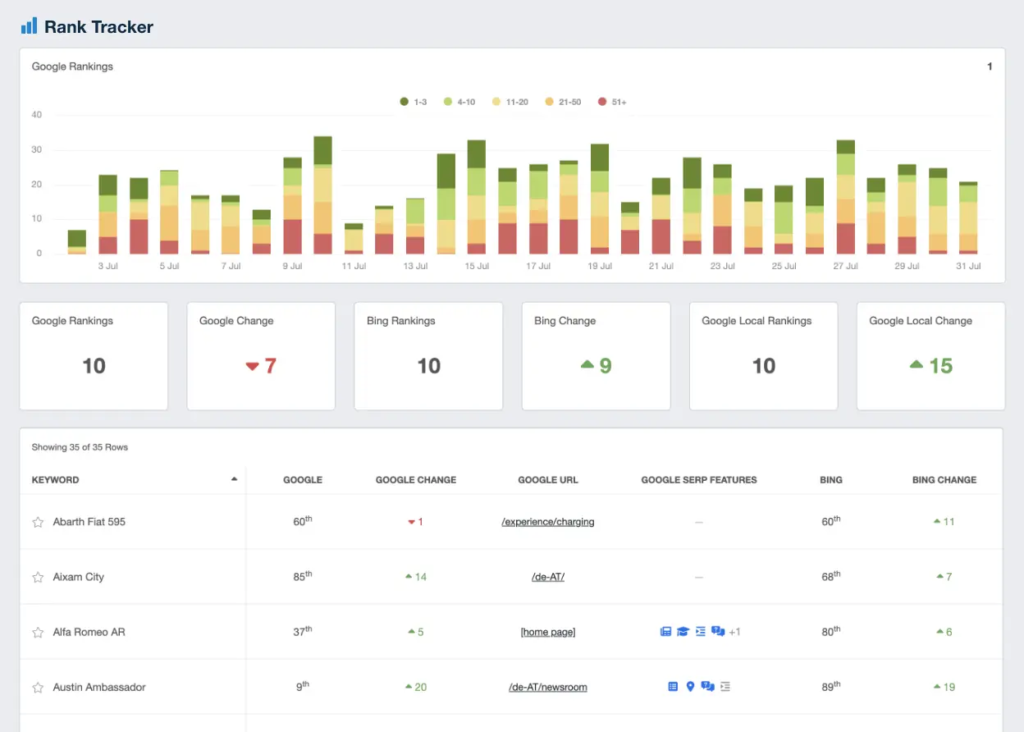
- Keyword rankings
- Click-through rate (CTR)
- Bounce rate
Google Analytics and Google Search Console are free tools that provide insights into how your content performs, what people search for, and how Google views your site.
Common SEO Mistakes to Avoid
- Keyword stuffing
- Duplicate content
- Ignoring mobile optimization
- Neglecting technical SEO issues
Focusing on quality and user experience will always outweigh shortcuts.
Conclusion: SEO Is a Marathon, Not a Sprint
Ranking on Google without paying requires patience, strategy, and consistent effort. By understanding how search engines work, researching the right keywords, creating high-quality content, and optimizing both on-page and technical elements, you build a strong foundation for long-term organic growth.
Start with a clear plan, track your results, and continuously improve — SEO rewards those who prioritize value for users.

